field note
Nine columns and a Monday morning. What a RAID log can do.
What a RAID log can do when the review is built around it.
By Shafen Khan//Updated /3 min read

AI-generated image. The dashboards below are real screenshots, on invented data.
tl;dr
- Every delivery team keeps a RAID log: actions, risks, issues and decisions. Before every review, someone rebuilds the picture by hand.
- We took a standard nine-column log, filled it with a made-up Workday deployment, and built the Monday review on top of it. No new columns.
- It opens on what to escalate, what is late, what has no owner and what the customer owes. It compares this week with last week and writes the status report in one click.
try it yourself
The dashboard in this note is live.
Change a status and watch every number move. Push the review date a week and see what slips. Or paste your own log from Excel. Your log is never uploaded.
Open the live demoThe log everyone keeps
Every project that touches a customer has one. An ID, a type, a title, a description, an owner, a due date, a status, and a couple of yes or no flags.
It is a good log. The trouble is Monday.
Before every review, someone rebuilds the picture by hand. What slipped. Who owes what. What changed since last week. Then it gets copied into slides, and it tells the team nothing the log did not already know.
What we built
We started from a blank nine-column template and kept it as it is. No new columns. Then we filled it with 34 invented items for a made-up Workday deployment: in the middle of testing, 105 days from go-live.
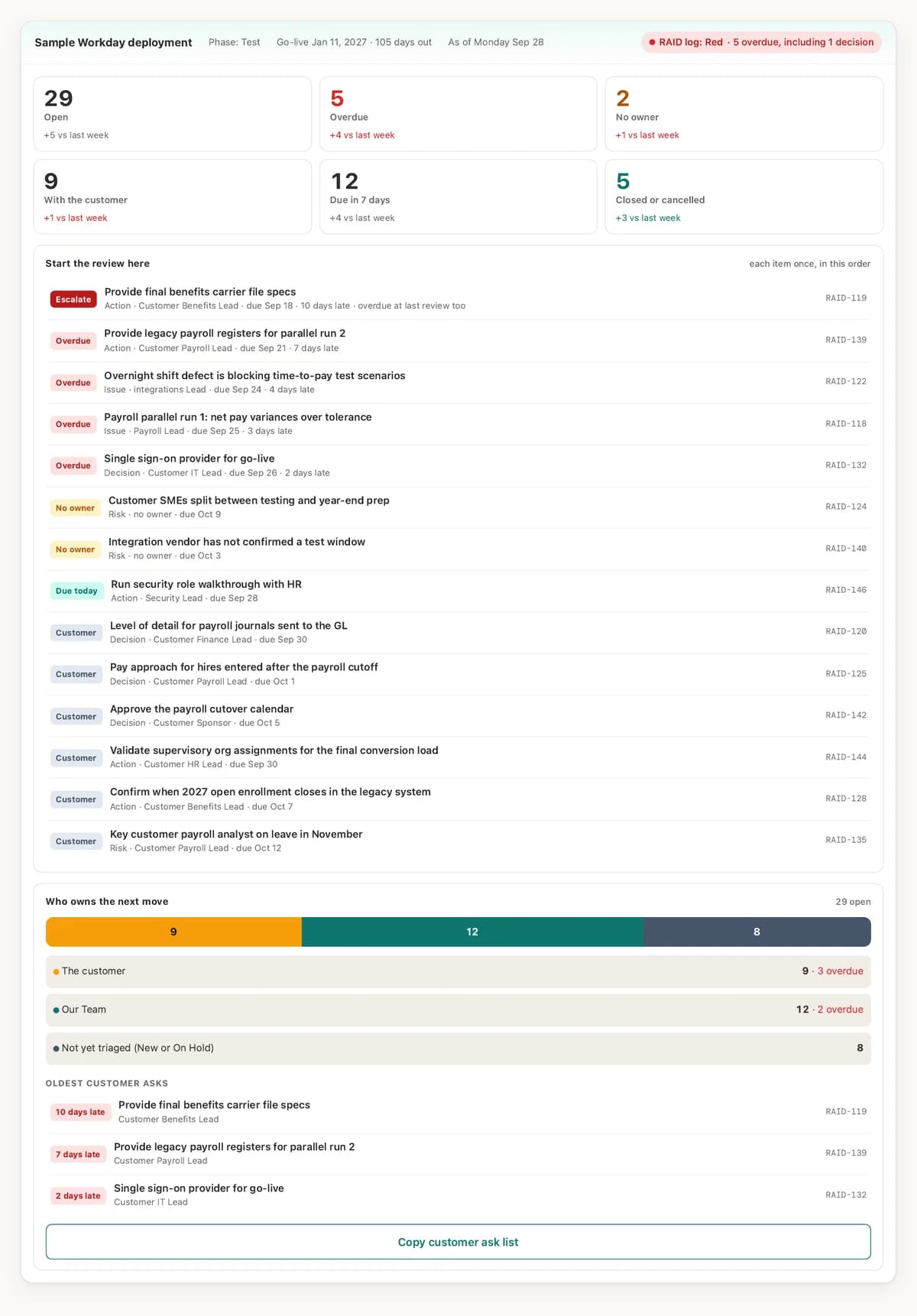
- The review order is set before the meeting. Items overdue two reviews running come first, then the rest of what is late, then items with no owner, anything due today, and what the customer owes.
- Who owns the next move. Every open item is with the customer, with your team, or not yet triaged.
- One click for the status report. The customer-facing report comes from the same rows. Nothing gets copied into slides.
- Every number opens. Tap a count, a name or a cell and the log filters to the items behind it.
The part a spreadsheet does not show you on its own
A spreadsheet shows you this week. So the review keeps last Monday's copy of the log and compares the two.
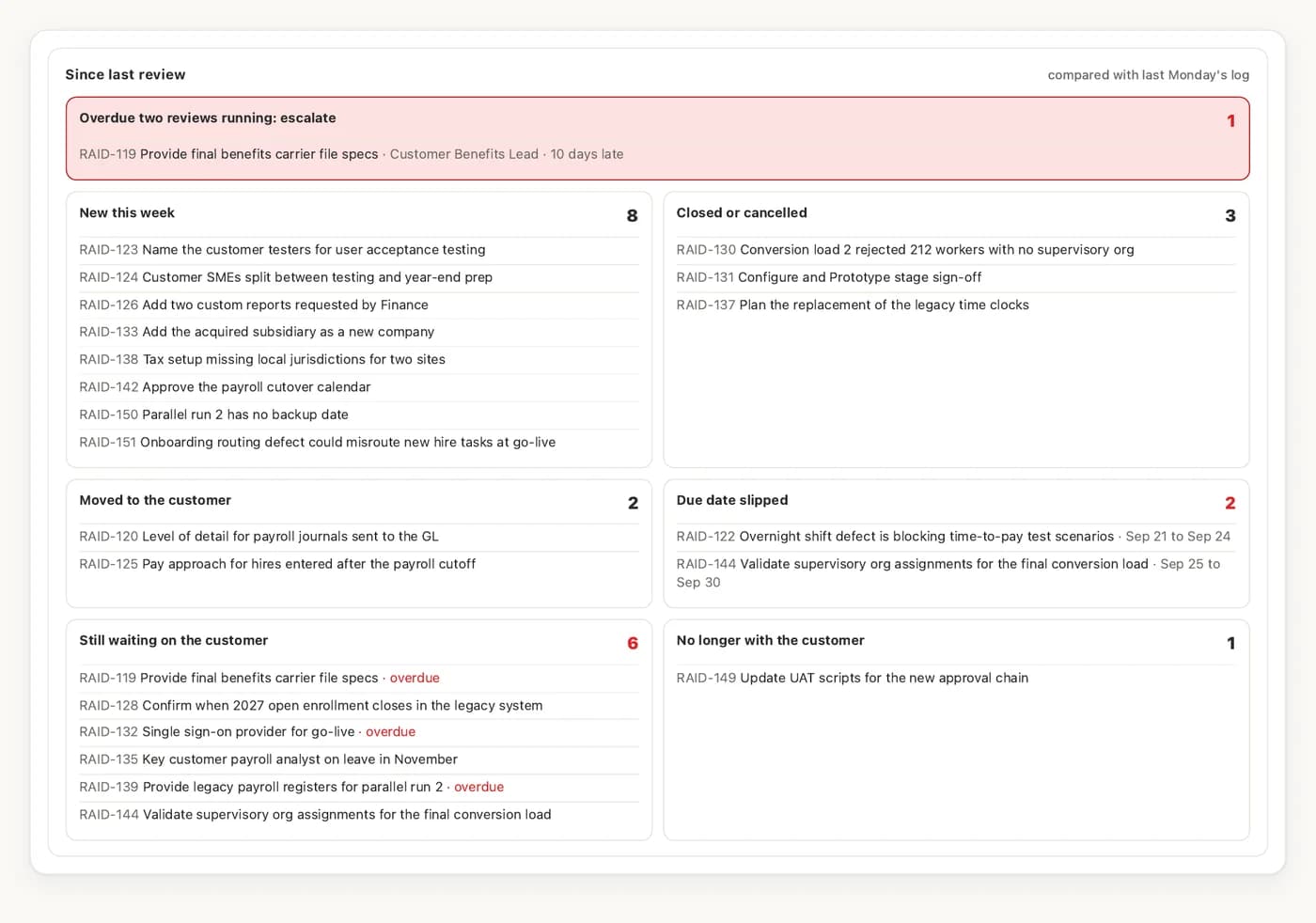
What is new, what closed, what slipped, and the one leadership asks about: what was overdue last week and is still overdue now.
Then we tried to break it
Before anyone saw it, three review passes tried to break it: a senior Workday project manager's read, every sentence checked against what the screen does, and a phone and keyboard check. Everything found was fixed.
What this means if you run projects
Start with the thing your team already keeps: the log, the tracker, the sheet that gets rebuilt every week. We build the review around how your team actually runs, for a fixed price agreed before the work starts. Your data stays where you decide it lives.
pass it on
Send it to a coworker, your boss or a friend who has this problem.
Handing it to someone who prefers paper? Get the one-pager to pass on.
keep reading
Your website looks finished. Here is what Google can't see on it.
Three free checks any owner can run tonight, and a free checker that runs them for you.
Field NoteI asked what a fingerprint was. Then it found a video I thought was gone.
A short code made from a file's contents, and why a business should care.
Bring the sheet your team rebuilds every week.
We will show you what it could do on Monday morning, built from what you already keep.